
How exactly does a subdomain takeover occur?

basically it is when what we have a dangling DNS record for an Azure resource (a VM or a Web app). When the Azure resource is deleted, the corresponding CNAME record stays. The attacker can find the respective subdomain and create the same resource under the same CNAME record with their own Azure account and take control of the subdomain associated with it.
Here’s a simple dig check to see the CNAME record of an example site
dig testing.forsubdomain.takeover

; <<>> DiG 9.18.30-0ubuntu0.22.04.2-Ubuntu <<>> testing.forsubdomain.takeover
;; global options: +cmd
;; Got answer:
;; ->>HEADER<<- opcode: QUERY, status: NOERROR, id: xxxxxx
;; flags: qr rd ra; QUERY: 1, ANSWER: 4, AUTHORITY: 0, ADDITIONAL: 1

;; OPT PSEUDOSECTION:
; EDNS: version: 0, flags:; udp: 65494
;; QUESTION SECTION:
;testing.forsubdomaintakeover.        IN    A

;; ANSWER SECTION:
testing.forsubdomain.takeover.    3600    IN    CNAME    example.azurewebsites.net.

;; Query time: 332 msec
;; SERVER: 127.0.0.53#53(127.0.0.53) (UDP)
;; WHEN: Wed Mar 12 01:27:59 IST 2025
;; MSG SIZE  rcvd: 221
Now that you’ve checked the dig lookup, it’s time to check if its theoretically vulnerable, check out this https://github.com/EdOverflow/can-i-take-over-xyz/issues/35 for the list of subdomains and the DNS records that show vulnerability.
The ultimate and last line of defense in Azure lies in its domain validation feature. Let’s talk about this further.
When we visit the site mentioned in the CNAME record, we’ll get something like this, indicating the first signs of a possible takeover

Azure name reservation service
One of Azure's primary defenses against subdomain takeover is the Name Reservation Service, which is automatically enabled for App Service resources. This service implements a critical security control: upon deletion of an App Service app or App Service Environment (ASE), immediate reuse of the corresponding DNS name is forbidden except for subscriptions belonging to the tenant of the subscription that originally owned the DNS. Which means that you cannot perform the subdomain takeover for a while.
How does this happen now? Onto the next cool concept!
Domain verification tokens and TXT records
For example, if you own forsubdomain.takeover and want to add it as a custom domain to an Azure App Service, you would need to create a TXT record with the name "asuid.forsubdomain.takeover" and a value containing the verification ID provided by Azure, which typically looks like "5975973A85973A812AC2AC3A855973A812AC973A812AC12AC" this is a DVT (domain veritifacation token)
The Domain Validation Process

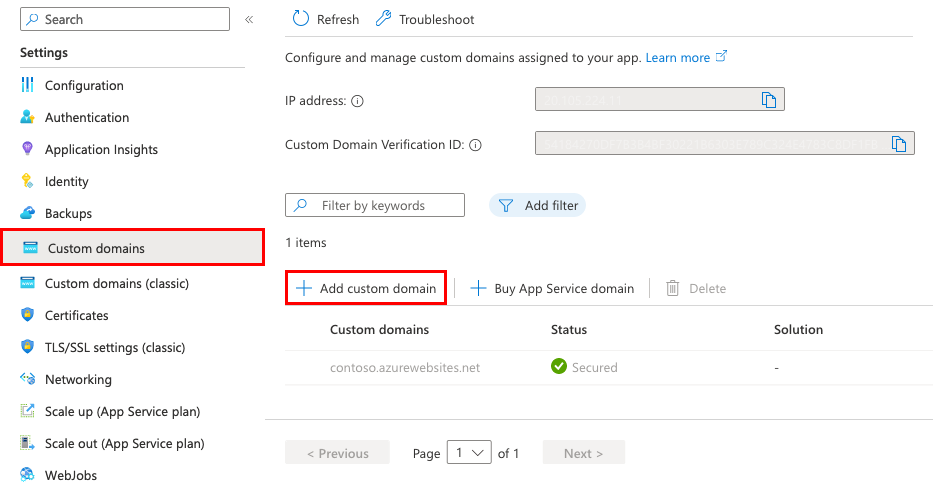
The domain validation process in Azure follows a structured workflow designed to ensure secure domain configuration. When adding a custom domain to an Azure App Service, the platform guides users through a validation procedure that requires two critical DNS records:
A domain mapping record: Either an A record (for root domains) that points to the app's IP address or a CNAME record (for subdomains) that points to the app's default domain name
A verification TXT record: The asuid.subdomain.takeover TXT record containing the domain verification ID
After adding these records with your domain provider, Azure's validation process verifies both records exist and are correctly configured. The platform provides a user-friendly interface that displays green check marks next to both domain records when they are properly set up. Only after successful validation will Azure allow the custom domain to be added to the service.
Services implementing this defense
App Service
Container Apps
Traffic Manager
Azure CDN
CloudApp
Virtual Machines
Blob Storage
References
Azure docs: https://learn.microsoft.com/en-us/azure/
can-i-take-over-xyz repo https://github.com/EdOverflow/can-i-take-over-xyz
dig lookup tool https://toolbox.googleapps.com/apps/dig
Comments
Join the discussionNo comments yet. Be the first to comment.


